Food & Language guide
How to Order Food in China Without Speaking Chinese
A practical 2026 restaurant guide for ordering food in China without speaking Chinese, with QR menus, payment, allergies, and fallback phrases.
Menu translations and staff responses can be incomplete. For serious allergies or medical dietary needs, use professional judgment and avoid uncertain foods.
Quick answer
Use photos, QR menus, translation, short allergy cards, and payment backups.
Use this practical sequence to prepare, act, and recover if the normal plan does not work:
- Check whether the restaurant uses table QR ordering, counter ordering, or staff ordering.
- Use menu photos, translation screenshots, or popular dish lists to choose items.
- Show dietary restrictions before ordering, not after food arrives.
- Confirm spice level, meat type, and key allergens with short phrase cards.
Applies to travelers who do not speak chinese, visitors ordering in restaurants, food courts, cafes, and small shops, travelers with payment or menu translation concerns.
Key facts
Check whether the restaurant uses table QR ordering, counter ordering, or staff ordering.
Ask staff to order for you or move to counter ordering.
Use a specific allergy or restriction card and choose simpler dishes.
Try the other app, ask for card or cash, and use a calm phrase card explaining you are a foreign traveler.
Ordering, payment, and menu help happen at restaurants.
Use phrase cards to ask for simple menu help.
Step-by-step plan
- 01
Check whether the restaurant uses table QR ordering, counter ordering, or staff ordering.
Official visual reference
Identify the official Meituan Waimai food-delivery app

If you use delivery as a fallback instead of a restaurant QR menu, first identify the official app listing. A restaurant can still offer counter ordering when a local-login prompt blocks the QR flow.
Apple App Store · Meituan Waimai by Sankuai TechnologyReviewed Jul 12, 2026
- 02
Use menu photos, translation screenshots, or popular dish lists to choose items.
- 03
Show dietary restrictions before ordering, not after food arrives.
- 04
Confirm spice level, meat type, and key allergens with short phrase cards.
- 05
Keep payment backup ready before ordering in small restaurants.
- 06
Save the restaurant name and address if you need a receipt, delivery, or follow-up.
Official visual reference
Keep a visible order record for delivery follow-up
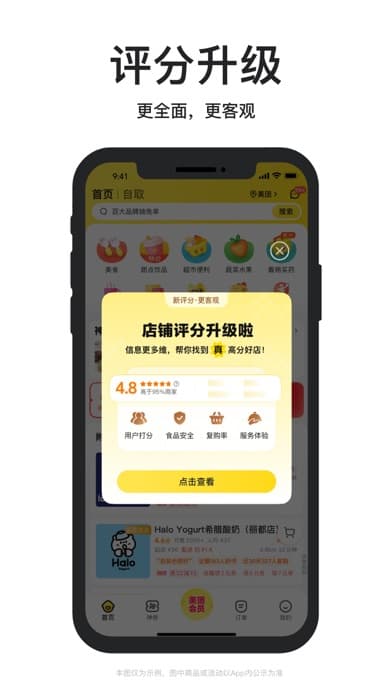
For delivery, keep the restaurant name, order record, and destination available. If the app asks for a local login you cannot complete, use a staffed restaurant or hotel help instead of forcing repeated verification.
Apple App Store · Meituan Waimai by Sankuai TechnologyReviewed Jul 12, 2026
- 07
For high-risk allergies, choose restaurants with clear ingredient communication and avoid ambiguous sauces or broths.
When the normal plan fails
The QR menu requires a local login.
Ask staff to order for you or move to counter ordering.
A dish contains an unexpected ingredient.
Use a specific allergy or restriction card and choose simpler dishes.
Payment fails after eating.
Try the other app, ask for card or cash, and use a calm phrase card explaining you are a foreign traveler.
Practical details
Source cross-check
This answer was checked against State Council: Payment service guide for overseas visitors to China and AMap Global on the Apple App Store. A third source, CDC Yellow Book: China travel health guidance, was used where the answer depends on implementation detail or traveler-facing handling. Additional support from CDC Travelers Health: Food and water safety abroad was kept when official rules and platform execution need to be separated. Where sources use different scope or dates, the guide follows the current official or most directly authoritative source and keeps platform or traveler-facing material as implementation context only.
Phrase cards
Simple order
English
Ask for one popular dish that is not spicy.
中文
您好,请推荐一个不辣的招牌菜,我想点一份。
Picture menu
English
Ask staff to order from a photo or menu picture.
中文
您好,我不会中文。请根据这张图片帮我点一份一样的菜。
Ingredient check
English
Ask whether an unwanted ingredient is included.
中文
您好,请问这道菜里面有这个食材吗?如果有,请帮我换一道没有的菜。
FAQ
- Can I order by pointing at photos?
- Often yes, especially in casual restaurants and food courts, but confirm dish size, spice, and key ingredients if important.
- Are QR menus always easy for foreigners?
- No. Some require local login, phone, or payment setup; ask staff to order manually if needed.
- What should allergy text look like?
- Short and direct: “I am allergic to peanuts. Please do not use peanuts or peanut oil.”
Sources and review
- State Council: Payment service guide for overseas visitors to ChinaOfficial · checked Jun 28, 2026
- AMap Global on the Apple App StorePlatform · checked Jun 28, 2026
- CDC Yellow Book: China travel health guidanceOfficial · checked Jun 28, 2026
- CDC Travelers Health: Food and water safety abroadOfficial · checked Jun 28, 2026
Visible guide facts must be supported by the page sources and rechecked before the next update date.
Plan the whole trip
Turn this answer into a China trip plan.
Peachspring Atlas turns practical guide decisions, timing, bookings, movement, and backup plans into a route you can actually use.